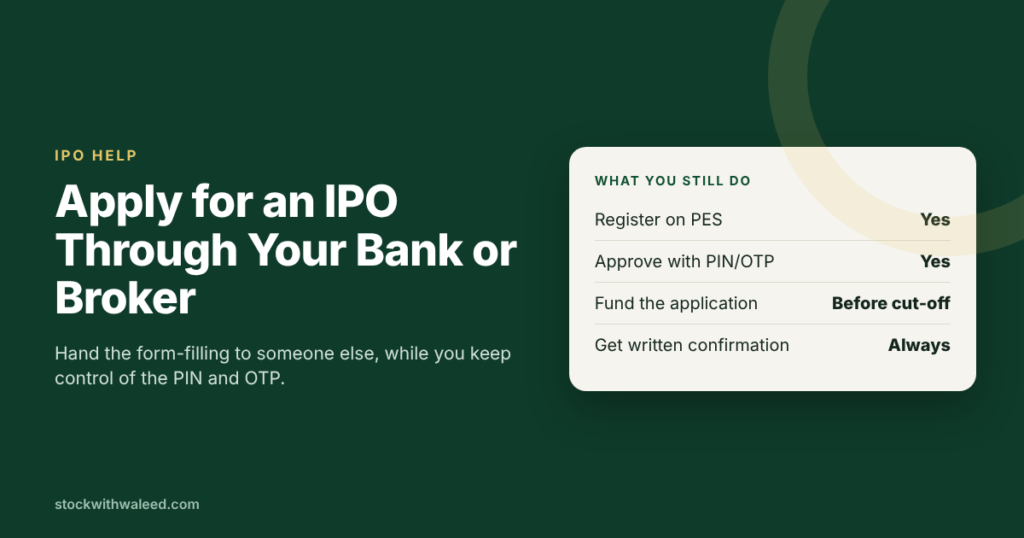
You can apply for an IPO in Pakistan without touching the e-IPO website yourself. On PSX’s e-IPO System (PES), your broker can apply for you once you add them as an authorised participant, and your bank can register you and apply from its own panel. Either way, you still approve the application with the PIN or OTP sent to your phone, and the broker or bank still needs the money from you before it pays. This guide covers both routes, what to ask for, and the deadlines that catch people out.
The three ways to apply on PES
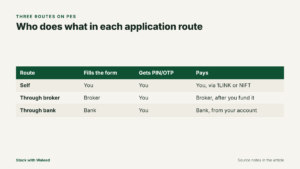
| Route | Who fills in the application | Who receives the PIN/OTP | Who pays |
|---|---|---|---|
| Self | You | You | You, through 1LINK or NIFT |
| Through your broker | Your broker (TREC holder) | You | Broker, after you fund it, through 1LINK or NIFT |
| Through your bank | Your bank | You | Bank, from your account, through 1LINK or NIFT |
The PES terms make one point clear: if you authorise a broker or bank to use PES for you, you remain responsible for the instructions you give them, and PSX is not liable if they breach those instructions. So be precise about which IPO, how many shares and from which account.
Route 1: Apply through your broker
This is the most common hands-off route, especially for people who already trade.
Step 1: Authorise your broker on PES
- Register on PES yourself first (see the main application guide).
- From your PES homepage, open Quick Links, then My Participant.
- Click Add Participant and select the broker where you hold your CDC sub-account.
Your broker can now submit e-IPO applications on your behalf. If your broker doesn’t see you, it can also register you from its own PES panel as a “TREC-defined investor”.
Step 2: Tell the broker exactly what to apply for
Send a written instruction (email or your broker’s official channel, not a casual voice note). Include:
- The company name of the IPO
- Number of shares (in the lot size the prospectus allows)
- Your CDC sub-account number
- How you will fund it (from your trading account balance, or a fresh transfer)
Step 3: Fund the application and confirm the PIN
The broker enters your sub-account number and the quantity, then submits with the PIN linked to your registration. For payment, the broker chooses 1LINK or NIFT. With NIFT, the OTP comes to your phone and you’ll need to pass it to the broker during the call.
On CDC’s CES portal, the rules are spelled out in recent prospectuses: authorised participants can apply for their sub-account holders and pay only after receiving the subscription amount from the sub-account holder. Shares are then credited directly to your sub-account (Sitara Petroleum prospectus, 2026). In practice, put the money in your trading account a day early.
What a good broker does
- Sends you a confirmation with the application reference after submitting
- Applies on day one of the subscription window, not the last evening
- Tells you the allotment result and when shares are credited
- Doesn’t pressure you to borrow or use margin to apply
Route 2: Apply through your bank
Several banks offer e-IPO help to customers. Meezan Bank and HabibMetro, for example, describe e-IPO services on their websites, letting account holders subscribe and pay through ATM, internet banking or the mobile app. Some banks also help at branches.
How it works on PES
- You contact your bank and ask it to register you for e-IPO and apply for a specific IPO.
- The bank logs into its own PES panel and either registers you as a new investor or finds you under Bank Defined Investors.
- The bank opens your profile, clicks Subscribe Issue and picks the IPO.
- It selects CDC Investor Account (if you have one) or CDC Facilitation Account, and enters the quantity.
- It enters the PIN that was sent to your mobile during registration, so you’ll need to share it with the bank officer handling your request.
- Payment goes through 1LINK or NIFT. With NIFT, the OTP arrives on your phone and you give it to the bank.
- The bank can later view your subscription details under Subscribed Applications.
Notice that the bank route on PES offers the Investor Account and Facilitation Account options, while the broker route uses your broker sub-account. If you want shares straight into a trading account, the broker route is simpler.
Broker vs bank: which is better?
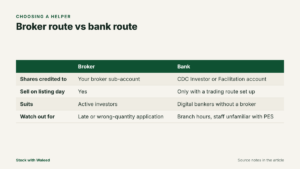
| Broker | Bank | |
|---|---|---|
| Shares credited to | Your broker sub-account | Your CDC Investor Account or the IPO Facilitation Account |
| Ready to sell on listing day | Yes | Only if you already have a trading route set up |
| Good for | Active investors | People who bank digitally but don’t have a broker yet |
| Main risk | Broker applies late or for the wrong quantity | Branch staff unfamiliar with PES; branch hours |
Safety rules when someone applies for you
- Share a PIN or OTP only with your own broker or bank, on a call you initiated to their official number. The PES terms make you liable for anything done with your credentials.
- Never pay into a personal account. Subscription money goes to the e-IPO collection channel through 1LINK or NIFT, or to your own trading account with the broker.
- Don’t let anyone apply in your name for their money. Prospectuses warn that false and fictitious applications are prohibited and the money may be forfeited under Section 87(8) of the Securities Act, 2015.
- Keep the confirmation. Ask for the application reference and payment receipt in writing.
Authorising your broker on CDC’s e-IPO (CES)
Some brokers apply through CDC’s Centralized e-IPO System rather than PES. Recent prospectuses describe how that works: sub-account holders can request their brokers (TREC holders who are CDS participants) to subscribe for them by authorising, or adding the details of, those participants in CES. The broker may need CDC to activate its ID on the CES portal. Once authorised, the broker can subscribe for you and pay through the channels on CES, but only after receiving the subscription amount from you. Shares are credited directly to your sub-account.
So if your broker says it uses CES, register on cdceipo.com and add the broker as an authorised participant there.
A message template for your broker
Send something like this through your broker’s official email or app. Your broker already holds your CNIC on file, so you don’t need to send it again:
Please apply on my behalf in the [Company] IPO retail portion.
Name: [as on CNIC]
CDC sub-account: [number]
Shares: [quantity, in lots of 500 or as per prospectus]
Funding: from my trading account balance of Rs [amount], available now.
Please confirm the application reference and payment receipt.
This gives the broker everything it needs and creates a written record if anything goes wrong.
Costs
The prospectuses reviewed for this guide don’t list a fee for e-IPO applications by brokers or banks, and PES and CES registration is free. Some brokers may still have their own service charges, so ask before you instruct them. You’ll pay normal commission when you later sell the shares.
Deadlines
The PES window closes at midnight on the last subscription day. Brokers and banks have their own internal cut-offs that are often earlier, sometimes by a full day, because they need time to process many clients. Ask for the cut-off when you instruct them.
Frequently Asked Questions
-
Can I apply for an IPO in Pakistan without using the e-IPO website myself?
Yes, where your bank or eligible securities broker supports applications on your behalf. PSX PES allows registered investors to use their bank or broker for IPO applications, subject to the applicable requirements. Confirm the procedure with your institution before the subscription deadline. -
Can I apply for an IPO through my bank in Pakistan?
Yes, if your bank supports the relevant IPO subscription service and you meet its account and registration requirements. Some banks offer access through PSX PES, CDC CES or their digital banking channels. Check your bank's official instructions because the procedure differs between services. -
Can I apply for an IPO through my stockbroker?
Yes. An eligible broker may submit an application for an existing client through the supported e-IPO system. You may need to authorise the broker, provide your securities account details, specify the share quantity and ensure that sufficient funds are available. -
Is PSX e-IPO registration free?
Yes. The PSX e-IPO portal states that registration and its e-IPO service are free. However, confirm whether your bank or broker charges for any separate account or related service. -
What is the difference between PSX PES and CDC CES?
PES is the Pakistan Stock Exchange's Electronic Initial Public Offering System. CES is the Central Depository Company's Centralized e-IPO System. Both support electronic IPO subscriptions, but their registration steps, account options and payment procedures can differ. -
Do I need a CDC account to apply for an IPO?
The account requirement depends on the platform and offering. You may need a CDC Investor Account, a broker-linked CDS sub-account or another eligible account option, such as an IPO Facilitation Account where supported. Check the current portal instructions and prospectus before applying. -
Can I apply for an IPO through my bank if I do not have a broker?
Potentially, yes. If your bank supports the relevant e-IPO service, you may be able to apply without an existing brokerage account, subject to the accepted account options and offering rules. Ask whether a CDC account or other securities account is required and how you would trade any allotted shares later. -
Can my broker apply for an IPO using my trading account balance?
A broker may be able to use your available trading account balance under the agreed funding arrangement. Confirm that the funds are cleared, sufficient and available for the subscription. Ask for written confirmation of the amount used and the application reference. -
Do I have to share my OTP or PIN with my broker or bank?
Authentication requirements vary by platform and transaction. Never disclose your banking PIN or password. Treat OTPs and e-IPO credentials as sensitive, verify any request through an official channel you initiate, and use the platform's prescribed verification procedure. Do not share codes with unsolicited callers. -
What happens if my broker submits the application but payment fails?
The application may remain incomplete or unpaid. Contact your broker immediately, check the relevant portal and follow the official payment instructions. Do not submit a duplicate application until you have confirmed the original application's status and the applicable rules. -
Can I apply for the same IPO through both my bank and broker?
Do not assume that separate applications are permitted. Follow the IPO prospectus and platform rules, and ask the relevant institution whether a previous application has already been recorded. Duplicate applications can lead to rejection under applicable offering rules. -
an I sell IPO shares immediately after allotment?
You can sell shares through a brokerage account once the shares are credited, the securities are eligible for trading and the applicable listing and trading arrangements permit it. If your shares are held in a CDC Investor Account, you may need to arrange the appropriate brokerage and account-transfer process before trading. An IPO allotment does not guarantee a particular selling price or profit. -
What happens if my IPO application is unsuccessful?
If your application does not receive an allotment, the subscription amount should be refunded according to the applicable prospectus and payment arrangements. Check the refund instructions and contact the relevant bank, broker or platform if the money does not return within the stated timeframe. -
What is the deadline for applying through a broker or bank?
The official subscription closing date is set out in the IPO announcement and prospectus. Your bank or broker may require instructions and funds earlier to allow processing. Ask for the institution's internal cut-off and complete the application well before it expires. -
Can I apply for an IPO through mobile banking?
Some banks support IPO-related services through their mobile apps, internet banking or ATMs. The exact process depends on the bank and platform. For example, Meezan Bank describes payment through its mobile app, internet banking and ATMs, while HABIBMETRO lists similar digital payment options for its e-IPO service. -
Is applying through a bank safer than applying through a broker?
Neither route is automatically safer in every situation. Both require you to verify the institution, follow the official process, protect your credentials and confirm the transaction. Choose a supported route that fits your account arrangements, and keep written evidence of the application and payment.
If you don’t have a CDC account yet, read which CDC account to choose for an IPO. If your application hits an error, try common e-IPO errors and fixes.
For education only, not investment advice. Services and cut-off times vary by broker and bank.


