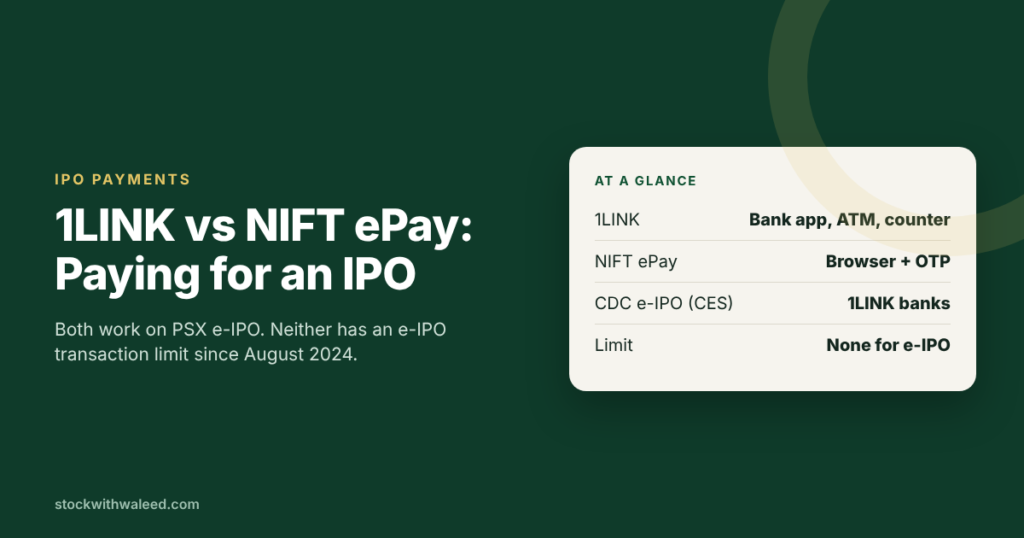
For most people, 1LINK is the easier way to pay for an IPO: you copy the payment reference from PSX e-IPO and pay it inside your normal bank app, like a bill. NIFT ePay is the better pick when your bank app doesn’t show the e-IPO payment option, because it runs in your browser with an OTP. Both are accepted on PSX’s e-IPO System (PES), neither has a transaction limit for e-IPO payments, and your application only counts once one of them succeeds.
How the two routes compare
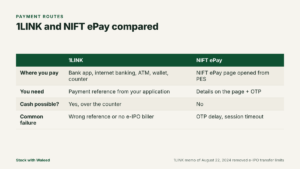
| 1LINK | NIFT ePay | |
|---|---|---|
| Where you pay | Your bank’s app, internet banking, ATM, mobile wallet or branch counter | The NIFT ePay page that opens from PES |
| What you need | The payment reference (transaction or subscription ID) from your application | Bank details on the ePay page plus the OTP sent to your phone |
| Available on PES | Yes | Yes |
| Available on CDC’s CES | Yes | Recent prospectuses list only 1LINK member banks for CES |
| Cash payment possible | Yes, over the counter at many banks | No |
| Transaction limit for e-IPO | None (1LINK memo, August 22, 2024) | None stated in prospectuses |
| Main failure point | Reference entered wrongly or bank app missing the e-IPO biller | OTP delays or session timeout |
Sources: Sitara Petroleum prospectus, April 2026 (e-IPO platform definitions); Sarmaaya’s e-IPO walkthrough for the screens.
Paying with 1LINK, step by step
- Submit your application on PES and confirm it with your PIN.
- Choose 1LINK on the payment screen. Note the payment reference PES shows you. Banks call it different things: Meezan Bank’s e-IPO page calls it a Transaction ID, and HabibMetro calls it a Subscription ID.
- Open your bank app or internet banking and find the e-IPO or IPO payment option. It is usually under bill payments or investments.
- Enter the reference. The app should fetch the exact amount due.
- Confirm the payment and save the receipt.
If you prefer cash, many banks accept the payment over the counter against the same reference. This helps people who don’t use digital banking, but branch hours matter: subscription windows close at midnight, and branches close much earlier.
Paying with NIFT ePay, step by step
- Submit your application on PES and confirm it with your PIN.
- Choose NIFT. PES sends you to the NIFT ePay page.
- Enter the details the page asks for and click Send OTP.
- Enter the OTP you receive on your mobile and click Pay.
- Wait for the confirmation that the transaction is complete before closing the window.
NIFT ePay works well when your bank’s app doesn’t list e-IPO as a payment type. The weak spot is the OTP: if it arrives late, the session can expire and you’ll have to start the payment again.
The “transaction limit” problem is solved
Before August 2024, many investors couldn’t pay for large IPO applications because banks applied their normal daily transfer caps. PSX and CDC, working with SECP and the State Bank, got this changed. 1LINK, with SBP’s support, instructed all member banks to remove limits on fund transfers for e-IPO transactions (ARY News, August 30, 2024). Prospectuses issued in 2026 still state there is no transaction limit on e-banking payments for e-IPO.
If your bank blocks a payment anyway, ask its helpline to check the e-IPO limit, and mention the 1LINK memo dated August 22, 2024.
What happens to your money after you pay
Your payment doesn’t go to the company straight away. Subscription money is collected through the banking channel into accounts maintained for the issue. Under Section 69 of the Companies Act, 2017, as set out in recent prospectuses, application money has to be kept in a separate bank account with a scheduled bank until the company is no longer liable to repay it (for example, if listing permission were refused). After allotment, money for allotted shares goes to the company and the rest is refunded. That’s why the payment route only affects convenience, not your rights.
Timing tips
- Pay on day one. Recent subscription windows ran midnight to midnight over two days, and last-evening traffic slows apps and SMS.
- Keep the phone handy. NIFT needs an OTP; your bank app may also send one.
- Check your balance first. A failed payment for low balance means starting again.
- Don’t close the browser during NIFT processing until you see the completion message.
- Screenshot everything: application reference, payment reference, bank receipt.
Mobile wallets
The 1LINK route lists mobile wallets among the payment channels in walkthroughs such as Sarmaaya’s. Whether your particular wallet shows an e-IPO option depends on the wallet provider. If it doesn’t, use your bank app or NIFT ePay.
Which one should you use?
- Your bank app shows an e-IPO or IPO payment option: use 1LINK. It is quick and you’ll have a receipt in your normal transaction history.
- Your bank app doesn’t have the option: use NIFT ePay from the PES screen.
- You want to pay in cash: use 1LINK over the counter, and go early on the first subscription day.
- You applied through CDC’s CES rather than PES: use 1LINK.
Charges
The prospectuses don’t list a fee for e-IPO payment. Some banks advertise the service as free; HabibMetro’s e-IPO page, for example, lists “no service charges” for its customers. Check your own bank’s schedule of charges if you’re unsure.
If the money left your account but the application shows unpaid
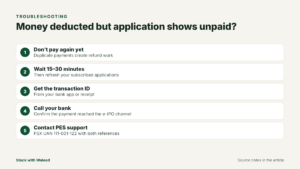
- Wait 15–30 minutes and check again. Confirmations can lag.
- Get the transaction ID from your bank app or receipt.
- Call your bank’s helpline and ask whether the payment reached the e-IPO collection account.
- If the bank confirms the payment, contact PSX e-IPO support (111-001-122) with the transaction ID and your application reference.
- Do not pay twice against the same application unless support tells you to.
More fixes are in common e-IPO errors and fixes, and the full application process is in how to apply for an IPO in Pakistan.
Frequently Asked Questions
-
Can I pay from someone else's bank account?
Pay from your own account where possible. Refunds return through the banking channel, and paying from another person's account can complicate both the refund and any question about who really made the application. -
Can I split one application across two payments?
No. Each application has one payment reference for the full amount: shares × strike price. -
Is there a deadline for payment after I submit?
The payment has to be completed within the subscription window, which closes at midnight on the last day. An application left unpaid at closing doesn't count. -
Where does a refund go?
If you don't get some or all of the shares you paid for, the money is refunded to the bank account you used. Meezan Bank's e-IPO page, for example, says the amount for unsuccessful applications is refunded to the investor's respective account.
Timing and process are covered in IPO refunds in Pakistan.
For education only. Payment options can change with each issue, so check the payment section of the prospectus.


