To apply for an IPO in Pakistan, you register once on the PSX e-IPO System (PES) at eipo.psx.com.pk, log in during the two public subscription days, choose the IPO, enter your CDC account details and the number of shares, confirm with the PIN sent to your phone, and pay through 1LINK or NIFT ePay. Registration is free and open all year. The whole application takes about ten minutes once your account is set up.
You need four things before you start: a valid CNIC, a mobile number registered in your name, a bank account with internet or mobile banking, and ideally a CDC account (a sub-account with a broker or a CDC Investor Account). If you don’t have a CDC account yet, you can still apply through the IPO Facilitation Account, and open a proper account after you get shares.
Since September 1, 2025, physical (paper) applications for IPOs have been discontinued under the revised SECP framework, so the e-IPO route is the only way most retail investors can apply now (Business Recorder, July 18, 2025).
What you need before you apply
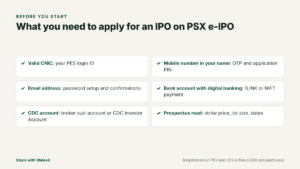
Get these sorted a few days before the subscription window opens. Most failed applications happen because someone tries to open an account, register on PES and pay all on the last evening.
| Requirement | Why you need it | Tip |
|---|---|---|
| Valid CNIC | Your CNIC is your PES login ID and links to your CDC account | Check the expiry date. An expired CNIC can block CDC verification |
| Mobile number in your name | OTP during registration and the PIN used to confirm every application | Use a number you will have during the subscription days |
| Email address | Password setup link and confirmation emails | Avoid a work email that filters unknown senders |
| Bank account with digital banking | Payment through 1LINK or NIFT channels | Make sure the account has enough balance before you apply |
| CDC account (optional but recommended) | Shares are credited here after allotment | A broker sub-account or a CDC Investor Account both work |
If you have no CDC account at all, read our comparison of CDC Investor Account, Facilitation Account and broker sub-account before you pick one. The choice affects how fast you can sell after listing.
PES and CES: the two e-IPO portals
Pakistan has two electronic IPO systems, and every recent prospectus lists both:
- PES, the PSX e-IPO System at eipo.psx.com.pk, run by the Pakistan Stock Exchange.
- CES, the Centralized e-IPO System at cdceipo.com, run by the Central Depository Company (CDC).
Both accept retail applications for the same IPO. Registration on each is free and available 24/7 throughout the year. Payment through PES can be made via 1LINK and NIFT member banks, while CES uses 1LINK member banks. You only need one of them. This guide walks through PES because it supports three ways to apply (yourself, through your broker, or through your bank), and the steps on CES are similar.
These details come from the Sitara Petroleum Service Limited prospectus (April 2026), which describes both systems in its definitions section. Later prospectuses use the same wording, so it is a reliable reference.
5 Steps from Registrtion to Payment
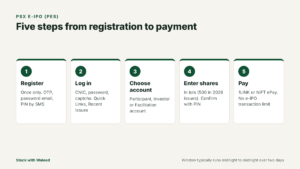
Step 1: Register on PES (one time only)
- Go to eipo.psx.com.pk and click Register in the top menu.
- Choose Individual (or Corporate if you are registering a company) and fill in the form: name, CNIC, mobile number, email and bank details.
- Read and accept the terms and conditions, then click Register Now.
- Enter the OTP sent to your mobile number and click Verify.
- Open the email from PES and set a password. Follow the password policy shown on screen.
- You will get a second email confirming registration and an SMS with a PIN code. Save this PIN. You need it to confirm every IPO application.
The PES terms say the investor is fully responsible for any activity done with their user ID, PIN and password, so don’t share them with anyone, including people who offer to “apply for you” on WhatsApp.
Step 2: Log in and find the IPO
- Log in with your CNIC number, password and the captcha.
- From the top menu, open Quick Links and then Recent Issues.
- Click the IPO you want. The page shows the issue details, including the number of shares in the retail portion and the subscription dates.
- Click Subscribe.
The Subscribe button only works during the public subscription period. Recent IPOs have run these windows from midnight to midnight across two days. For example, Pak-Qatar General Takaful’s retail subscription ran on January 28 and 29, 2026, starting and ending at midnight (subscription figures, Arif Habib Limited, February 2, 2026).
Step 3: Choose your account type and number of shares
PES asks where the shares should go. You’ll see three options:
| Option | Choose it if | What you enter |
|---|---|---|
| CDC Investor Account | You hold an account directly with CDC Investor Account Services | Your CDC investor account details |
| CDC Participant Account | You have a sub-account with a broker | Your sub-account number and the broker’s name from the dropdown |
| CDC Facilitation Account | You don’t have any CDC account yet | Only the number of shares |
Next, enter the number of shares. Applications are made in lots. In the 2026 subscription results published on the PSX data portal, applications were grouped into 500, 1,000, 1,500, 2,000 and “above 2,000” share categories, which tells you that recent issues used 500-share lots. The prospectus for each IPO states the minimum application and the multiple, so confirm it there.
The amount you pay is simple: number of shares × strike price. If the strike price is Rs 34 and you apply for 1,000 shares, you pay Rs 34,000. Our IPO application amount calculator works this out and shows what you might actually receive if the issue is oversubscribed.
Click Submit and enter the PIN code from your registration SMS.
Step 4: Pay through 1LINK or NIFT ePay
After you submit, PES gives you two payment routes:
- 1LINK: pay using your bank’s ATM, internet banking, mobile app, mobile wallet or over the counter, against the payment reference PES generates.
- NIFT ePay: PES opens the NIFT ePay page, you enter your details, receive an OTP, and click Pay. You’ll see a confirmation once the transaction completes.
There is no transaction limit for e-IPO payments. 1LINK instructed its member banks in a memo dated August 22, 2024 to remove limits on fund transfers for e-IPO transactions, and recent prospectuses repeat this. If your bank app still blocks a large payment, call the bank and quote that memo.
Your application is not complete until payment goes through. An application with no payment is not counted in the subscription figures. We cover the differences between the two payment routes in OneLink vs NIFT ePay for IPO payment.
Step 5: Check your application status
Log back in and check your subscribed applications. Keep a screenshot of the payment confirmation and the application reference. If something looks wrong (for example, payment was deducted but the application shows unpaid), contact your bank first with the transaction ID, then PES. Recent prospectuses list the PSX IT division contact for PES queries, at 111-001-122.
Applying through CDC’s e-IPO (CES) instead
If your bank or broker points you to CDC’s portal rather than PES, the flow is similar. HabibMetro Bank’s e-IPO page describes it this way:
- Register on CDC’s e-services portal (cdceipo.com).
- Log in and open the eIPO tab, then Public Offerings.
- The open IPO appears at the top with its Subscribe button enabled.
- Enter your CDS Participant ID and account number, or select the IPO Facilitation Account if you don’t have a CDS account.
- Check the details CES fetches from CDS, and enter the number of shares.
- CES shows a Subscription ID on screen and sends it to your mobile and email.
- Pay against that Subscription ID through your bank’s mobile app, internet banking or ATM.
The main practical difference is the payment network: recent prospectuses say CES payments go through 1LINK member banks, while PES supports both 1LINK and NIFT. The allotment rules are the same whichever portal you use, because the registrar combines applications from both systems.
Applying for family members the right way
Each adult can apply in their own name with their own CNIC, their own registration and their own CDC account. That’s normal and allowed. What isn’t allowed is using a relative’s CNIC to submit an application that is really yours, funded by you and for your benefit, just to get more chances in the ballot. Prospectuses call these false or fictitious applications and warn the money may be forfeited.
For minors, rules depend on whether a CDC account can be opened for them through a guardian. Ask your broker before applying; don’t use a parent’s credentials to apply for a child.
What happens after the subscription closes
The process after you pay follows a fairly fixed sequence:
- Subscription figures are published within a few days. The lead manager sends PSX a letter with the number of applications in each category and states how shares will be allotted.
- Allotment: if the retail portion is oversubscribed, small applications are often filled first and larger ones get balloting or pro-rata treatment.
- Shares are credited and refunds are paid. Under PSX’s listing regulations, the company must allot shares and refund unsuccessful applicants within ten working days of the close of public subscription, and credit shares to CDS accounts within the same period (PSX Listing Regulations, Main Board).
- Listing and trading begin once PSX issues a listing notice.
Here is how that played out for Sitara Petroleum Service Limited in 2026, using dates from its PSX PRIDE page:
| Stage | Date |
|---|---|
| Book building | May 4–5, 2026 |
| Public (retail) subscription | May 11–12, 2026 |
| Listing | May 21, 2026 |
So from the last day of retail subscription to listing took nine days. For the full mechanics, read how IPO allotment works in Pakistan and how and when IPO refunds are paid.
Real 2026 example: what one application looked like
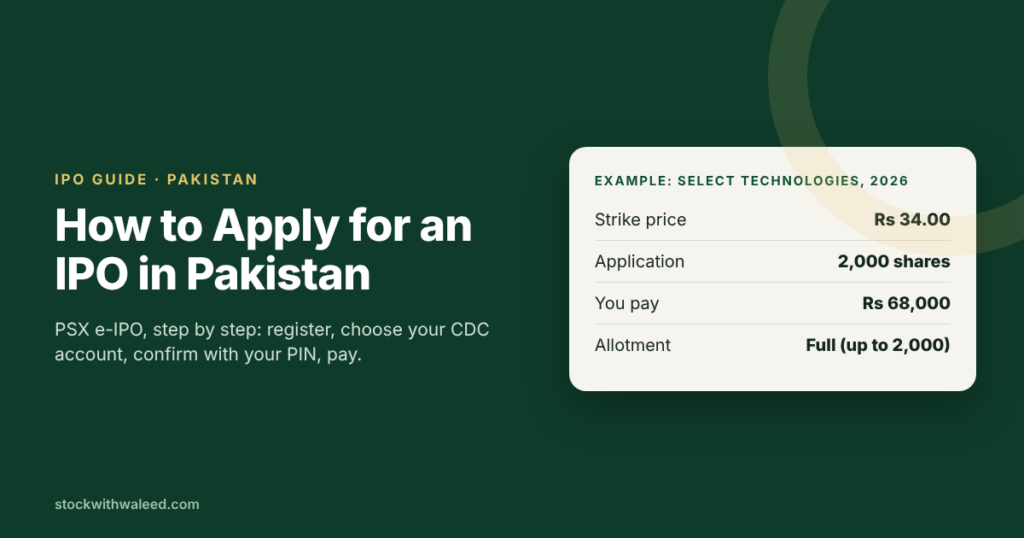
Take the Select Technologies Limited IPO. Its strike price was set at Rs 34 per share after book building on June 22–23, 2026, and retail subscription ran on July 2–3, 2026 (book building result, public subscription figures).
Suppose you applied for 2,000 shares:
- Payment at application: 2,000 × Rs 34 = Rs 68,000.
- The retail portion was 22,222,222 shares and received applications for 38,433,500 shares from 12,186 applicants.
- The lead manager announced that applications for up to 2,000 shares would be allotted in full, with larger applications allotted pro-rata.
- Result: you would have received all 2,000 shares. Someone who applied for 10,000 shares would have received a proportion and a refund for the rest.
That pattern (small applications in full, larger ones cut back) has shown up across several 2026 IPOs. It is one reason why spreading money over a sensible application size often works better than one large application. More on that in the allotment guide.
Applying through your broker or bank instead
PES lets you hand the work to someone else:
- Through your broker: from your PES homepage, go to Quick Links, then My Participant, then Add Participant, and select the broker where you hold a sub-account. Your broker can now apply on your behalf. Many brokers also apply through CES once you authorise them there.
- Through your bank: the bank logs into its own PES panel, registers you as a bank-defined investor, and applies for you. The PIN and OTP still come to your phone, so the bank can’t apply without you.
This route suits people who don’t want to deal with portals. The trade-off is that you depend on the broker or bank to act before the deadline. Our guide to applying for an IPO through your bank or broker covers this in detail.
Rules that can get your application rejected
Every prospectus includes warnings in capital letters. Three matter most to retail investors:
- False or fictitious applications are prohibited, and the application money may be forfeited under Section 87(8) of the Securities Act, 2015. Applying in the names of relatives without their real participation, or using borrowed CNICs to get more balloting chances, falls under this.
- One CNIC, one application per issue is the safe rule. Duplicate applications from the same person are routinely screened out by the registrar.
- The application must be paid within the window. The window closes at midnight on the last day, and bank systems can be slow near the deadline.
Problems like a missing PIN, an OTP that never arrives or a CNIC that says “already registered” are common. See common e-IPO errors and how to fix them.
A day-by-day plan for your first IPO
| When | What to do |
|---|---|
| 2–3 weeks before | Open a broker sub-account or CDC Investor Account if you don’t have one. Account opening can take several days. |
| 1 week before | Register on PES and save your PIN. Confirm your bank app works for 1LINK bill or e-IPO payments. |
| After book building | Read the supplement to the prospectus. It gives the strike price, which decides how much you’ll pay. |
| Subscription day 1 | Apply and pay. Don’t wait for the last evening. |
| 2–4 days after close | Check the subscription figures notice on the PSX data portal for the allotment basis. |
| Within 10 working days | Check your CDC account for shares and your bank account for any refund. |
If you are brand new to all of this, start with our first IPO checklist for beginners.
How to find out which IPOs are open
PSX runs a public tracker called PRIDE that lists every company with an active listing application, its approval status, book building dates, subscription dates and the final prospectus. As of October 12, 2026, it shows three active main board applications: SE Fruits and Vegetable Limited, Abhi Microfinance Bank Limited and Selmore Pharmaceuticals Limited. We track these in upcoming IPOs on PSX.
Should you apply to every IPO?
No. Strong demand in 2026 (Service Long March Tyres’ book was filled in five seconds, Sitara Petroleum’s in eight minutes) has made IPOs look like easy money. They aren’t. An IPO is a share purchase in a company whose price has not yet been tested by the market, and you still need to read what the company does, how it will use the money and what risks it lists. Two practical starting points:
If you only invest in Shariah-compliant companies, check the company’s status first using our guide to checking whether a PSX IPO is Shariah-compliant.
Frequently Asked Questions
-
Is there a fee to register on PSX e-IPO?
No. Registration on PES and on CDC's CES is free, according to recent prospectuses. -
Can I apply without a CDC account?
Yes. Select the CDC Facilitation Account. If you get shares, they are parked in an IPO Facilitation Account maintained by CDC, and you'll be emailed to open a CDC Investor Account or a broker sub-account so the shares can be moved there. -
What is the minimum amount needed to apply for an IPO in Pakistan?
It depends on the strike price and the minimum lot. With 500-share lots, an IPO priced at Rs 18 needs Rs 9,000 for the smallest application, and one priced at Rs 34 needs Rs 17,000. -
Can I apply after the subscription closes?
No. Once the window closes at midnight on the last day, the Subscribe button is disabled. You can only buy the shares after they list on PSX. -
Can overseas Pakistanis apply?
Yes. Prospectuses define the general public as including resident and non-resident Pakistanis. Roshan Digital Account holders were given access to PES when it launched in 2022.
See how overseas Pakistanis can subscribe to PSX IPOs.
This article explains a process and is not investment advice. IPO rules can change with each prospectus, so confirm the dates, minimum application and allotment basis in the prospectus of the issue you are applying for.


